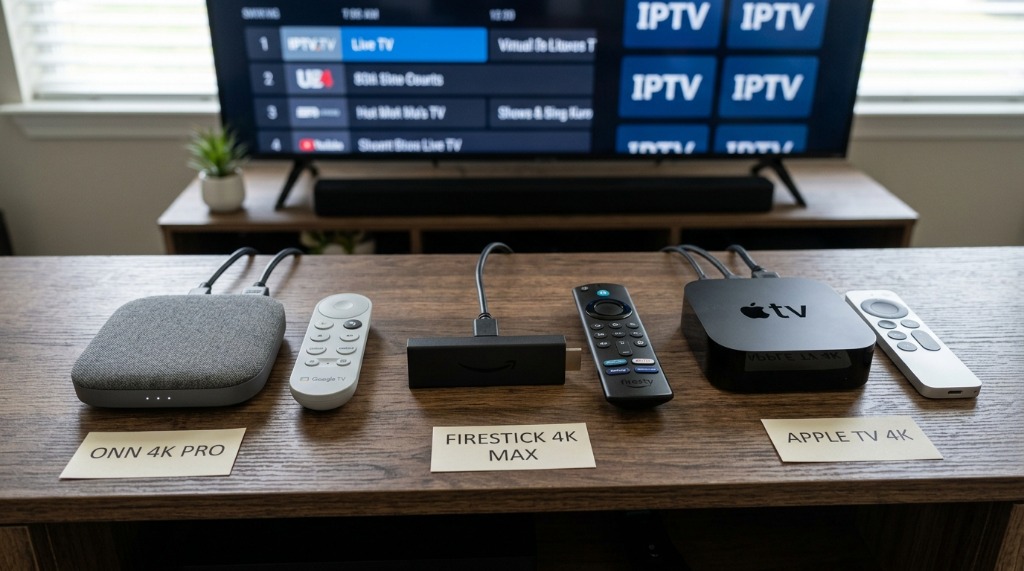
Choosing the best streaming device for iptv in 2026 depends directly on your budget, network setup, and sideloading requirements. For pure price-to-performance value and native Google Play Store access, the Walmart Onn 4K Pro ($49.88) is currently the undisputed budget champion in the United States. If you demand lag-free 4-screen sports multi-view on TiviMate, the NVIDIA Shield TV Pro remains unmatched. And for dedicated Amazon users, only the Fire TV Stick 4K Max (2nd Gen) preserves Android APK sideloading—allowing you to steer clear of Amazon’s locked-down new Vega OS.
The 2026 Firestick Sideloading Trap: Fire OS vs. Vega OS
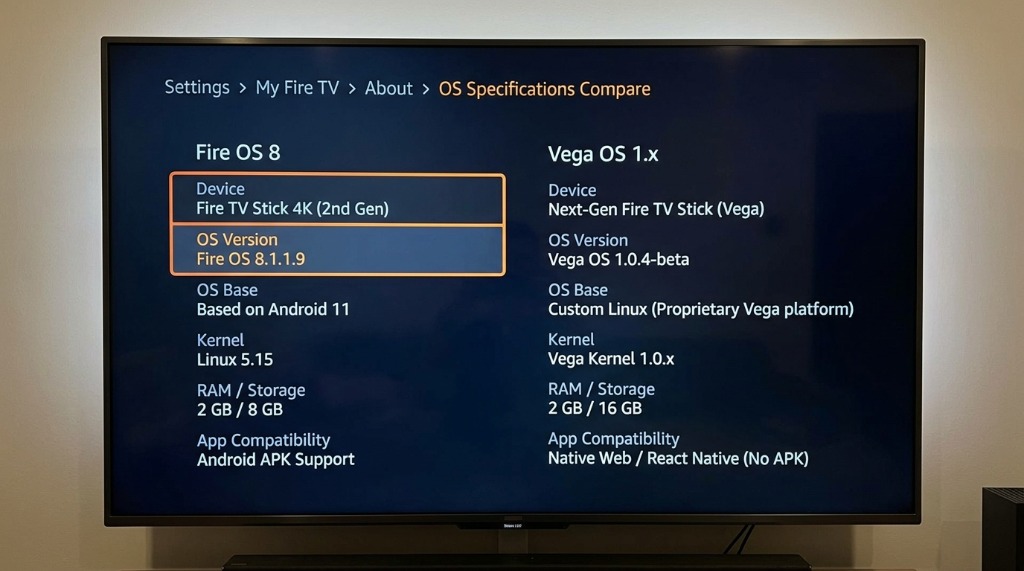
For over a decade, cord-cutters routinely recommended grabbing the cheapest $25 or $30 Amazon Fire TV Stick on sale. That advice is now officially hazardous. In late 2026, Amazon executed a dramatic architectural fork across its streaming hardware lineup, creating a critical distinction that every live TV enthusiast must understand: which firestick still allows sideloading vega os vs fire os.
Newer entry-level hardware—such as the budget Fire TV Stick HD and Fire TV Stick 4K Select—ships with Vega OS (OS 1.x). Vega OS is a proprietary Linux microkernel built entirely for web technologies and React Native. It completely discards the Android Open Source Project (AOSP) foundation, eliminates Dalvik/ART virtual machine execution, and strips out the "Install Unknown Apps" developer toggle. On a Vega OS device, Downloader cannot install Android applications, and standalone media APKs like TiviMate simply refuse to execute.
Thankfully, Amazon did not transition its flagship performance hardware to Vega OS. The Fire TV Stick 4K Max (2nd Gen) and the Fire TV Cube (3rd Gen) remain firmly anchored on Android 11-based Fire OS 8. These premium units maintain full APK sideloading, ADB debugging access, and total compatibility with Downloader, IPTV Smarters Pro, and TiviMate. If you are configuring a Fire OS stick today, follow our dedicated Firestick setup tutorial to ensure optimal buffer allocation.
🔍 Quick 30-Second Verification Tutorial: Before setting up your device, grab your remote and navigate to Settings > My Fire TV > About. Look at the "Software Version" line. If it reads Fire OS 8.x.x.x, your device is Android-based and 100% compatible with APK sideloading. If it reads Vega OS 1.x, return the device immediately and swap it for an Android TV box. For an in-depth breakdown, read our analysis of Firestick Alternatives for Live TV.
Top 5 Streaming Devices for 4K IPTV in the US Compared
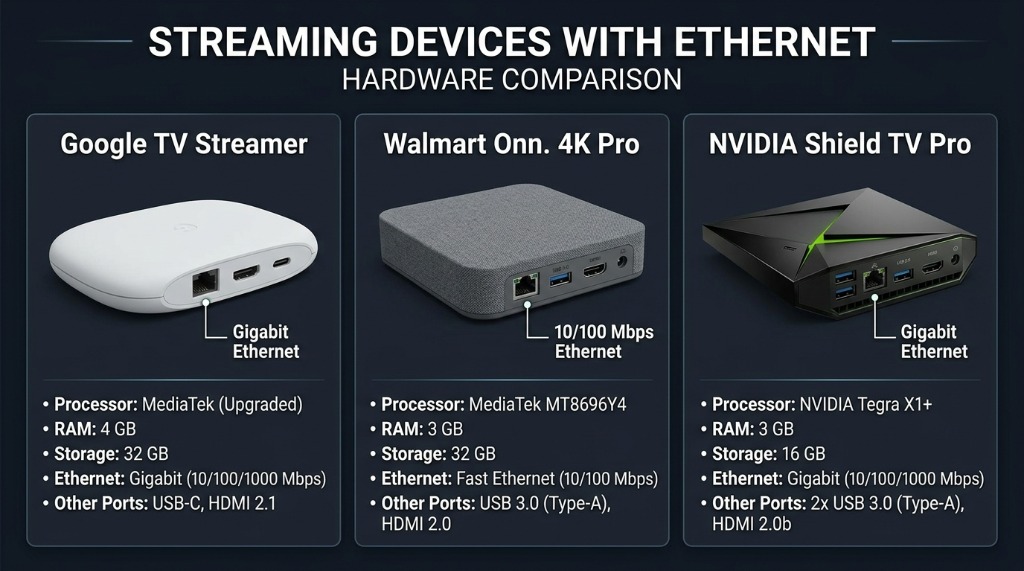
Evaluating the best streaming box for tivimate 4k requires looking past basic Netflix playback. Live IPTV streams pull sustained high-bitrate MPEG-TS video with real-time electronic program guide (EPG) data across 20,000+ channels. When answering what device do i need for iptv in usa homes, these five streaming devices represent the gold standard in 2026:
1. Walmart Onn 4K Pro ($49.88) — The Undisputed US Budget Champion
In a head-to-head comparison of firestick 4k max vs onn 4k pro for iptv, the Walmart Onn 4K Pro delivers unbelievable value. Operating on certified Google TV (Android 14), it packs 3GB of RAM and 32GB of onboard flash storage. That 3GB RAM pool prevents background crashes when scrolling through dense 7-day TV guides, while the 32GB storage ensures you never see "storage critically low" errors. It features built-in 100Mbps Ethernet, Wi-Fi 6, a USB 3.0 port for external recording drives, and direct Google Play Store certification—letting you install TiviMate Companion with a single click.
2. Amazon Fire TV Stick 4K Max 2nd Gen ($59.99) — Best Amazon Ecosystem Stick
For loyal Prime Video and Alexa users, the 2nd Gen Fire TV Stick 4K Max remains the only stick form factor worth buying. Powered by a snappy 2.0 GHz quad-core processor and Wi-Fi 6E tri-band support, it navigates menus with zero stutter. While its 16GB of storage and 2GB of RAM trail the Onn 4K Pro, its support for AV1 hardware decoding, Dolby Vision, and HDR10+ makes it a formidable performer—provided you stay away from Vega OS budget models.
3. Google TV Streamer 4K ($99.99) — The Modern Premium Google Desktop Box
Replacing the aging Chromecast dongle, the Google TV Streamer 4K adopts a sleek, set-top console design. Equipped with 4GB of RAM, 32GB of storage, and a native Gigabit Ethernet (1,000 Mbps) port, it is engineered for heavy network throughput. The generous 4GB RAM configuration provides instant channel switching and fluid multitasking between live sports and on-demand VOD libraries.
4. NVIDIA Shield TV Pro ($199.99) — The Ultimate Powerhouse for Multi-Screen Sports
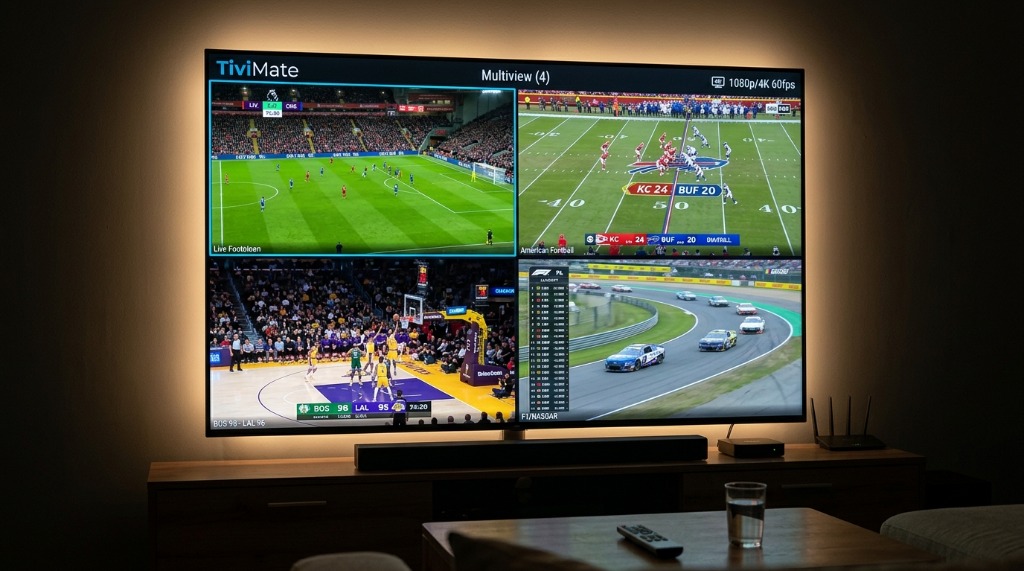
Even in 2026, the NVIDIA Shield TV Pro reigns supreme for enthusiast setups. Its Tegra X1+ processor and 256-core GPU effortlessly handle 4 simultaneous 1080p/4K 60fps streams inside TiviMate's multi-view grid without dropping a single frame. Combined with dual USB 3.0 ports, Gigabit LAN, and proprietary AI-enhanced 4K upscaling that sharpens 720p regional sports feeds in real-time, the Shield Pro is worth every penny for serious sports bettors and NFL fans.
5. Apple TV 4K 3rd Gen ($129–$149) — Best for Premium Apple Home Theaters
Examining apple tv 4k vs android tv box for live tv streaming reveals a fascinating dynamic. Apple's A15 Bionic chip delivers the fastest raw computing power and cleanest 60fps deinterlacing in the industry. While tvOS does not permit Android APK sideloading or TiviMate, dedicated Apple TV players like UHF, IPTV Smarters Pro, and GSE Smart IPTV deliver an astonishingly smooth, ad-free experience with seamless iCloud playlist synchronization.
| Streaming Device | OS & Sideloading | RAM / Storage | Network (Wi-Fi / LAN) | Best IPTV Player | Ideal Use Case | Approx. US Price |
|---|---|---|---|---|---|---|
| Walmart Onn 4K Pro | Google TV (Full APK & Play Store) | 3GB / 32GB | Wi-Fi 6 + Built-in Ethernet | TiviMate, Smarters Pro | Best Budget Pick for US Homes | ~$49.88 |
| Amazon Fire TV Stick 4K Max (2nd Gen) | Fire OS 8 (Android-based, APK Sideloading) | 2GB / 16GB | Wi-Fi 6E (Ethernet via OTG) | TiviMate, Downloader APK | Best Amazon Ecosystem Stick | ~$59.99 |
| Google TV Streamer (4K) | Google TV (Full APK & Play Store) | 4GB / 32GB | Wi-Fi 5 + Gigabit Ethernet | TiviMate, Sparkle TV | Best Modern Google Desktop Box | ~$99.99 |
| NVIDIA Shield TV Pro | Android TV (Full APK & Play Store) | 3GB / 16GB | Wi-Fi 5 + Gigabit Ethernet | TiviMate (Multi-Screen) | Best for 4-Screen Sports Power Users | ~$199.99 |
| Apple TV 4K (3rd Gen) | tvOS (App Store Only, No APK) | 4GB / 64GB–128GB | Wi-Fi 6 + Gigabit Ethernet (128GB) | UHF, IPTV Smarters, GSE | Best for Premium Apple Home Theaters | ~$129–$149 |
2026 IPTV Hardware Specification Checklist: What Actually Prevents Buffering?
A ubiquitous mistake among new cord-cutters is assuming that paying for 500 Mbps or 1,000 Mbps residential fiber guarantees buffer-free playback. In reality, local playback stutter is almost always caused by hardware bottlenecks or supplier-side congestion rather than your ISP's raw download bandwidth. When configuring your live TV station, verify these four hardware pillars:
- 1. RAM Capacity (Minimum 2GB; 3GB+ Strongly Recommended): Live TV apps do not function like Netflix. While Netflix buffers a single stream into temporary cache, apps like TiviMate must continuously parse 7 days of XMLTV program guide data for 20,000+ channels in RAM while decoding a live 60fps MPEG-TS video stream. When memory drops below 200MB free, the Android garbage collector aggressively kills background tasks, causing video hitching and audio desync. For multi-screen setups, check out our TiviMate Multi-Screen Sports Setup Guide.
- 2. Network Stability (Ethernet Over Wi-Fi): High-bitrate 4K sports broadcasts transmit uncompressed UDP/TS packets that are extremely sensitive to jitter and packet loss. While Wi-Fi 6 offers high theoretical bursts, local radio interference during peak evening hours introduces micro-stutters. Using built-in Ethernet (like on the Onn 4K Pro or Google TV Streamer) or a gigabit USB-to-LAN adapter stabilizes packet timing.
- 3. Hardware Video Decoding (HEVC H.265 & AV1): Top-tier IPTV servers encode 4K 60fps sports using HEVC (H.265) to maintain pristine clarity at efficient bitrates. Ensure your streaming device features dedicated silicon hardware decoding for H.265 Main 10 and AV1. Devices forced to rely on software decoding will overheat, drop frames, and throttle their CPU within 20 minutes of kickoff.
- 4. Anti-Freeze Server Infrastructure: Even a $200 NVIDIA Shield Pro will freeze if connected to an oversold $20/year budget IPTV supplier. Premium providers like Zyminex deploy load-balanced Content Delivery Networks (CDNs) with strict concurrency caps per server node, ensuring that your high-end hardware receives an unthrottled, continuous broadcast stream.
Sideloading vs. App Store Availability: Android TV vs. Fire OS vs. Apple tvOS
Software accessibility determines how quickly you can get from unboxing your hardware to enjoying live sports on your couch. Here is how the three major television platforms compare:
Google TV / Android TV (Walmart Onn, Google TV Streamer, NVIDIA Shield): The gold standard for cord-cutters. You can open the native Google Play Store and install TiviMate Companion or IPTV Smarters Pro with zero sideloading. If you need custom third-party utilities or beta APK builds, Google TV fully permits installing Downloader or using wireless ADB transfer with a single developer toggle.
Fire OS 8 (Amazon Fire TV Stick 4K Max): Sideloading remains straightforward via the Downloader app. However, you must first enable Developer Options by clicking the device name seven times under Settings > My Fire TV > About, and Amazon frequently pushes interface updates that rearrange menu layouts.
Apple tvOS (Apple TV 4K): Apple strictly prohibits third-party sideloading. However, you do not need it. The tvOS App Store hosts outstanding, highly polished IPTV players including UHF, IPTV Smarters Pro, and iPlayTV. These apps support full M3U playlist URLs, Xtream Codes APIs, and EPG mapping, executing with buttery-smooth 60fps animations. Once you have unboxed your device, follow our step-by-step Zyminex Setup Guides to get connected in under 5 minutes.
Frequently Asked Questions
What device do I need for IPTV in the USA?
For reliable 4K IPTV streaming in the US, you need an Android TV, Google TV, or tvOS device with at least 2GB of RAM (3GB+ recommended), dual-band Wi-Fi 6 or a physical Ethernet connection, and hardware support for HEVC (H.265) and AV1 video codecs. Top picks include the Walmart Onn 4K Pro ($49.88) for budget value, the Google TV Streamer 4K ($99.99) for rock-solid stability, the NVIDIA Shield TV Pro ($199.99) for multi-view power users, and the Apple TV 4K ($129+) for Apple home theater enthusiasts.
Can you sideload TiviMate on new Amazon Firesticks in 2026?
It depends on the model. Newer budget Amazon sticks running Vega OS (OS 1.x), such as the Fire TV Stick HD and Fire TV Stick 4K Select, have completely eliminated Android AOSP runtime and .apk sideloading. However, the Fire TV Stick 4K Max (2nd Gen) and Fire TV Cube (3rd Gen) still run Android-based Fire OS 8, maintaining full sideloading support for Downloader and TiviMate.
Is the Onn 4K Pro better than the Firestick 4K Max for live TV?
Yes, for most users. The Walmart Onn 4K Pro ($49.88) offers 3GB of RAM (vs 2GB on Firestick), 32GB of internal storage (vs 16GB), a built-in Ethernet port, a full-sized USB 3.0 port, and direct access to TiviMate in the Google Play Store without sideloading. It also avoids Amazon's aggressive ad bloat and the impending Vega OS lock-in.
Does Apple TV 4K support IPTV playlists and Xtream Codes?
Yes. While TiviMate is not available on Apple's tvOS, the Apple TV 4K runs premium IPTV apps including UHF, IPTV Smarters Pro, and GSE Smart IPTV directly from the App Store. Powered by the A15 Bionic chip, Apple TV 4K delivers the smoothest 60fps channel switching and highest-quality deinterlacing of any streaming device on the market.
Why does my IPTV buffer on a 4K Smart TV even with 500 Mbps internet?
Built-in smart TV operating systems (like Samsung Tizen, LG webOS, or Roku) feature underpowered processors and meager 1GB to 1.5GB RAM configurations. When parsing large 20,000+ channel EPG playlists, the TV's memory exhausts, causing severe interface lag and playback buffering. Connecting a dedicated external streaming box with 3GB+ of RAM and hardware decoding completely resolves this issue.
Final Recommendation: Which Box Should You Buy Today?
The 2026 streaming hardware landscape has clearly shifted in favor of open platforms. If you want the best all-around experience for under $50, pick up the Walmart Onn 4K Pro—it is the undisputed king of budget cord-cutting. If you want premier Gigabit stability for a high-end setup, invest in the Google TV Streamer (4K). For sports die-hards running 4-screen multi-view, the NVIDIA Shield TV Pro remains unmatched. And if you are committed to the Amazon ecosystem, buy the Fire TV Stick 4K Max (2nd Gen) to guarantee your sideloading rights stay intact.
No matter which device you plug into your television, remember that your hardware is only as good as the stream feeding it. Experience what true 4K 60fps sports and 22,000+ channels feel like without contracts or buffering circles. Take advantage of our zero-risk 24-hour free trial today, or explore our flexible multi-connection subscription packages to unlock the full potential of your home theater.
Written by Zyminex Streaming Labs
Benchmarking television hardware, testing decoding protocols, and empowering cord-cutters with open streaming freedom.
Ready for Buffer-Free 4K Streaming?
Instant Xtream Codes & M3U delivery. Compatible with Google TV, Onn, NVIDIA Shield, Firestick, and Apple TV. Over 22,000 live channels in 4K.