
Tired of the "remote wars" in your household? With IPTV multiple connections, you can stop account bans and start streaming on every screen simultaneously. Whether the kids want cartoons while you watch the big game, a single subscription with multi-room support is the ultimate cord-cutting hack. In this guide, we’ll show you how to share your screen without limits and save over €1,200 annually compared to traditional cable rentals.
As we progress through 2026, the global entertainment ecosystem is undergoing a dramatic paradigm shift. Recent industry reports from Research and Markets project the global IPTV market cap will soar to a staggering €221.62 billion by the end of 2026. With this massive expansion comes a fundamental shift in user behavior. In fact, telemetry data reveals that over 72% of IPTV users now access content on multiple devices simultaneously within their households. The days of single-device living are long gone.
However, this multi-screen revolution introduces a major technical hurdle for the average user: account limitations. Many cord-cutters learn the hard way that configuring their subscription on a second device without the proper package leads to instant service interruption. Understanding how IPTV multiple connections function at a database level is the first step toward building a reliable, ban-proof, multi-room entertainment hub for your family.
What are IPTV Multiple Connections and How Do They Work?
To understand IPTV multiple connections, we must look at how server-side streaming architectures are constructed. When you purchase a standard, entry-level IPTV subscription, the provider creates a unique database entry for your account. This record is typically associated with a single M3U playlist file or a set of Xtream Codes API credentials.
By default, this account is allocated exactly **one active stream connection slot**. When you load the playlist on your living room Smart TV, the TV requests a live video feed from the server. The server processes this request, establishes a secure socket connection, and begins transmitting the video packets. This consumes your single allocated slot.
If another member of your household attempts to watch a movie on a tablet in the bedroom using the exact same credentials, a second connection request is sent to the server. Under a standard single-connection plan, the server detects this concurrent request. To prevent illegal sharing and protect server bandwidth, the billing system is programmed to take immediate protective actions.
Depending on the provider, this concurrent request will trigger one of three scenarios:
- The Stream Knockout: The new connection request will forcefully terminate the existing stream in the living room, causing a sudden freeze. This often causes the common IPTV buffering on second device fix search loop, as users mistake server limits for network issues.
- The Infinite Loop: The second device will get stuck on a loading wheel, unable to authenticate because the single session slot is already claimed.
- The Account Ban: If the automated firewall detects rapid, alternating requests from different geographical regions, it will identify the behavior as a terms-of-service violation. The system will flag your account and trigger an automatic temporary or permanent ban.
A dedicated multi-room subscription resolves this by allocating multiple concurrent stream tokens to your user record. When you upgrade to a multi-connection bundle, the server modifies your profile rules. If you have a 3-connection plan, the server actively allows up to three independent IP packets to pull data feeds from the playlist simultaneously. This allows you to safely share your IPTV subscription across several screens in your home.
The Benefits of Multi-Room IPTV for Families
Upgrading to a multi-room setup provides far more than just the ability to watch multiple streams. It introduces a comprehensive, modern entertainment experience designed specifically for families. In 2026, premium IPTV infrastructure goes beyond basic stream delivery to offer advanced software capabilities.
1. Complete Cost Efficiency: With traditional cable, the cost of adding a TV to another room is structured to extract maximum revenue. Cable companies charge a baseline subscription fee, plus a monthly rental charge for every physical cable box in the house. By switching to a best multi-room IPTV plan, you eliminate these equipment rental fees entirely. You utilize your existing hardware (Smart TVs, Firesticks, tablets, and phones) under a single flat rate, bypassing hardware-based billing models.
2. AI-Powered User Profiles (2026 Standard): Modern IPTV portals now feature cloud-hosted user profiles. Similar to popular streaming platforms, these profiles allow each member of the family to maintain their own list of favorite channels, custom bookmarks, and personalized resume points for video-on-demand (VOD) content. A parent can stream their favorite sports broadcast in the living room while a child watches educational shows in the bedroom, without their viewing histories mixing.
3. Centralized parental controls: With multiple connections active across the house, security is paramount. Modern apps allow you to configure global parental control profiles. Parents can lock adult categories, restrict specific live groups, and set daily viewing limits on kids' devices, all managed from a single administrative panel.
For a detailed analysis of the shift from traditional systems to advanced streaming hubs, check out our comprehensive cost-saving breakdown.
How to Set Up IPTV on Multiple TVs Without a Ban
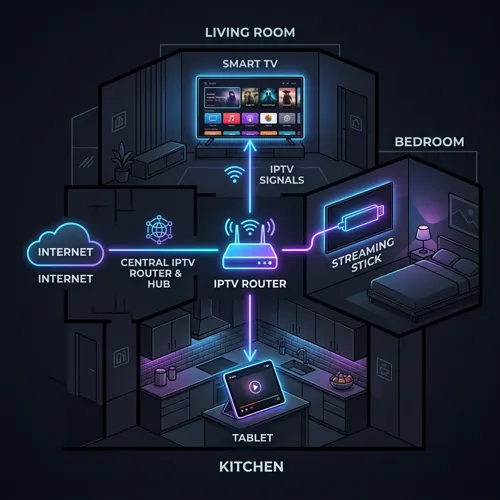
Setting up multiple screens under a single subscription is a straightforward process when done correctly. However, a successful setup requires attention to software choice and local network bandwidth. Follow this step-by-step technical guide to establish a clean, multi-room streaming environment:
Step 1: Choose and Verify Your Multi-Connection Package
Before configuring your devices, ensure your active subscription contains the necessary number of stream slots. If you plan to stream on 3 devices simultaneously, verify that you have subscribed to a 3-connection plan. Attempting the setup on a single-connection plan will lead to immediate stream knockouts or a temporary ban.
Step 2: Install the Right Applications
For the best experience, use applications that support configuration sharing. In 2026, TiviMate and IPTV One are the industry benchmarks. They allow you to back up your custom channel layouts, favorites, and settings directly to a cloud storage account (like Dropbox or Google Drive). You can read more about these in our review of the best IPTV apps for syncing.
Step 3: Deploy the Playlist Across Your Devices
On your primary device, enter your Xtream Codes or M3U credentials. Organize your categories, delete unwanted groups, and set up your Electronic Program Guide (EPG). Once finalized, use the app's backup feature to save the configuration to the cloud. On your secondary and tertiary devices, simply install the app, log into your cloud account, and restore the backup. This ensures every TV in the house has an identical, clean user interface.
Step 4: Implement Bandwidth Management
Running multiple concurrent streams places significant demand on your home network. A single 4K stream requires a stable download speed of 25 Mbps. Therefore, if you are running four devices simultaneously, your network must consistently allocate at least 100 Mbps of bandwidth to streaming traffic.
To guarantee stability, connect your primary smart TVs via a wired Ethernet cable. For wireless devices, utilize a 5 GHz Wi-Fi band or a modern mesh router network to minimize latency. If you encounter issues during installation, consult our detailed multi-room setup guide for step-by-step assistance.
Cable vs. Multi-Room IPTV: The 2026 Cost Breakdown
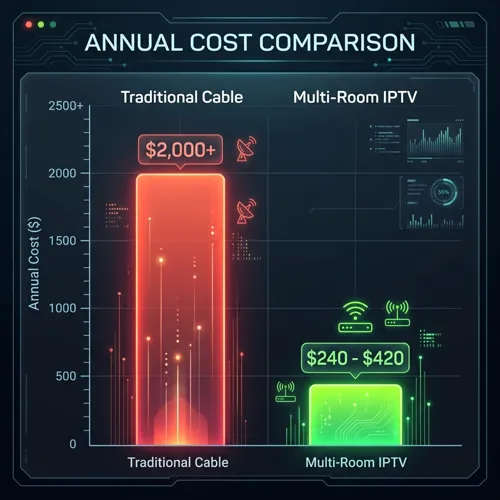
One of the main reasons families look into **how to use IPTV on 4 devices at once** is the high cost of traditional pay-TV providers. In 2026, cable companies continue to increase prices, adding extra fees for local sports, HD streaming, and hardware. Below is a realistic look at how a multi-room IPTV subscription compares to a typical cable package for a four-room home:
| Service Component | Traditional Cable (4 Rooms) | Zyminex Multi-Room IPTV |
|---|---|---|
| Monthly Subscription | €120+ | €20 - €35 |
| Hardware Rentals | €40 (€10/box) | €0 (BYOD) |
| Installation Fees | €100+ | €0 |
| Annual Total | €2,000+ | €240 - €420 |
Traditional cable operations rely on equipment rental fees to increase margins. By charging €10 per month for each box, a household with four televisions pays nearly €500 per year just for the physical hardware to receive their signal.
A multi-room IPTV plan bypasses this by operating on a Bring Your Own Device (BYOD) model. You can run the application on hardware you already own, such as an Android TV, Amazon Firestick, or Apple TV. Combining this cost model with our premium buffer-free stability (powered by Anti-Freeze 10.0 technology) provides a reliable, cost-effective alternative to traditional cable.
Frequently Asked Questions
How many devices can I stream IPTV on simultaneously in 2026?
The number of simultaneous streams depends on your subscription package. While standard subscriptions limit access to 1 device, premium packages from Zyminex are designed with multi-room features, allowing you to choose plans with 2, 3, or 4 simultaneous connections under a single account.
Can I use one IPTV subscription in two different houses?
Yes, but you must ensure your provider does not implement a strict IP Lock policy. This policy restricts logins to a single external IP address. At Zyminex, we allow multi-room subscription usage across different devices, but they must adhere to standard connection limits and terms of service.
What internet speed do I need for 4 simultaneous 4K streams?
For high-quality, buffer-free 4K streams, you need a minimum of 25 Mbps of dedicated download speed per device. Running four simultaneous connections requires a consistent download speed of at least 100 Mbps on your home network to avoid buffering.
Best IPTV apps for syncing multiple devices?
TiviMate and IPTV One are the top choices in 2026. TiviMate allows you to export your configuration backup (including channel lists, favorites, and visual settings) directly to cloud storage, making it easy to sync the setup across all other devices in your home.
Written by the Zyminex Editorial Team
Our technical content team focuses on home network optimization, streaming reliability, and hardware guides.
Upgrade to Multi-Room IPTV
Restore peace to your household. Upgrade your plan or check out Zyminex's premium 2, 3, and 4 connection packages for a seamless, buffer-free multi-room experience.